Firstly I would like to thank Paul at iBasso for sending me
this sample to review; this has had well over 200hrs of burn-in before
reviewing.
*disclaimer: This sample was provided for the purpose of
writing a review, no incentive was given to write a favourable review. All
opinions expressed are my own subjective findings.
Gear Used: DX200 > Symphones V8 build / Custom Art FIBAE3
/ Cleartune VS-2 / 64 Audio U6 and more.
Tech Specs:
Main Features
- Dual SABRE ES9028PRO DAC Chips.
- Bit for Bit Playback Support up to 32bit/384 kHz.
- Support of Native DSD up to 512x.
- XMOS USB Receiver with Thesycon USB Audio Driver, Easy to use USB DAC.
- Dual Accusilicon Ultra Low Phase Noise Femtosecond Oscillators.
- 4.2" IPS Screen (768*1280) with Capacitive Touch Panel, Bonded by OCA.
- Mini Optical Output and Mini Coaxial Output. - 8-core CPU. - 2GB LPDDR3. - 64G of Internal Memory. - 5G WiFi and Bluetooth4.0.
- Patented User Exchangeable AMP Card.
- Three Physical Buttons (Previous, Play/Pauses, Next)
- 150-Steps Digital Volume Control.
- Audio Formats Supported: APE, FLAC,WAV, WMA, AAC, ALAC, AIFF, OGG, MP3, DFF, DSF, DXD.
- Support for M3U Playlist
- 4400mAh 3.8V Li-Polymer battery (Play time varies depends on volume, music type, and AMP card)
- Dual SABRE ES9028PRO DAC Chips.
- Bit for Bit Playback Support up to 32bit/384 kHz.
- Support of Native DSD up to 512x.
- XMOS USB Receiver with Thesycon USB Audio Driver, Easy to use USB DAC.
- Dual Accusilicon Ultra Low Phase Noise Femtosecond Oscillators.
- 4.2" IPS Screen (768*1280) with Capacitive Touch Panel, Bonded by OCA.
- Mini Optical Output and Mini Coaxial Output. - 8-core CPU. - 2GB LPDDR3. - 64G of Internal Memory. - 5G WiFi and Bluetooth4.0.
- Patented User Exchangeable AMP Card.
- Three Physical Buttons (Previous, Play/Pauses, Next)
- 150-Steps Digital Volume Control.
- Audio Formats Supported: APE, FLAC,WAV, WMA, AAC, ALAC, AIFF, OGG, MP3, DFF, DSF, DXD.
- Support for M3U Playlist
- 4400mAh 3.8V Li-Polymer battery (Play time varies depends on volume, music type, and AMP card)
Specifications
2.5mm Balanced Output:
Output voltage 6Vrms Frequency Response: 20Hz-20KHz -0.16dB Signal to Noise Ratio:125dB Crosstalk: -122dB THD+N: < 0.0002%, -114dB (64O@3Vrms)
3.5mm HP Output:
Output voltage 3Vrms Frequency Response: 20Hz-20KHz -0.16dB Signal to Noise Ratio:122dB Crosstalk: -118dB THD+N: < 0.00032%,-110dB ([email protected])
Lineout:
Output voltage 3Vrms Frequency Response: 20Hz-20KHz -0.16dB Signal to Noise Ratio:122dB THD+N: < 0.00025%,-112dB Screen Size: 4.2inch 768*1280 Battery Capacity: 4400mAh
Case Dimension: 5.1L x 2.7W x 0.77H (inch) 128.5L x 69W x 19.5H (mm)
Weight: 240g or 8.5oz

Packaging, Build quality and Accessories:
The iBasso DX200 comes in a fairly big, 3 piece card box.
Once you remove the outer sleeve that only has the model number printed on it,
you will find an inner black box that slides apart. One this inner box there is
a picture of the DAP on the front, along with the model number but still no
specs anywhere on the box. You will find the player neatly placed in an inner
foam tray, lift this tray up and you will find the accessories. The box is very
well built and feels solid, and fitting of the price of the DX200.
The DX200 is superbly built, one of the best I have come
across, the casing is all metal and the front houses the touch screen. On the
top you have the power button and USB-C socket for charging and file transfer,
much better than normal Micro-USB. You also have an optical/coax output on the
top so you can use it as a transport with an external DAC. On the right you
have playback controls and the volume knob which is protected via a small metal
cover. The volume control has defined steps and is tight with no play; the
playback buttons also feel very good. On the left you have the MicroSD slot for
your memory card and on the bottom (AMP1) you have a 3.5mm line out, a 3.5mm
headphone out and a 2.5mm balanced out.
The DX200 comes with the AMP1 module as stock; a big selling
point are the interchangeable amp modules so you will see there are 2 small
screws on either side of the device to remove the amp section. The screen is
big and bright, it comes with a screen protector already installed. This player
does not have a user replaceable battery, but apart from that, it is very well
built. The sockets on the amp module are tight and everything feels very well
put together.

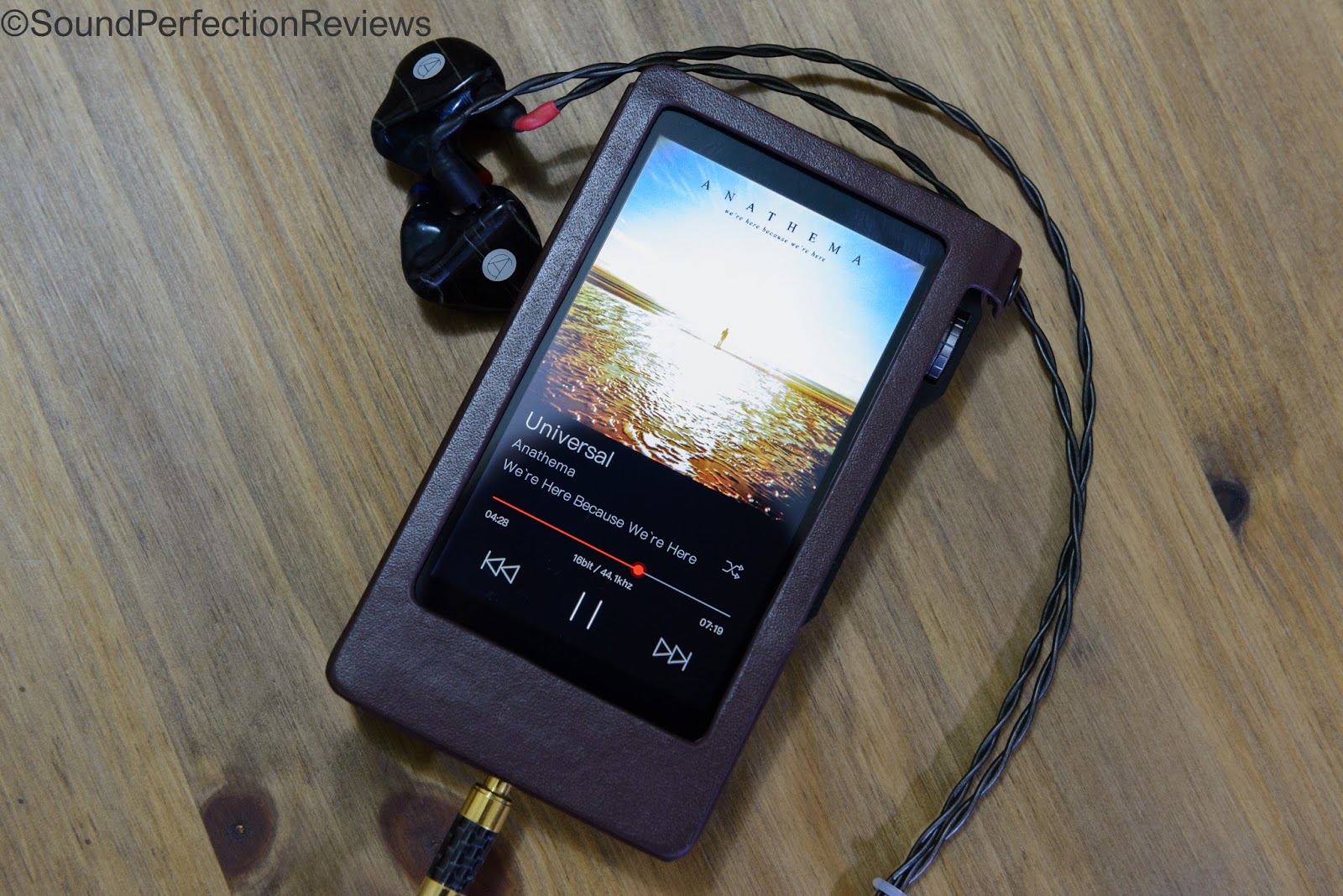
Accessory wise you get a lovely brown leather case that fits
perfectly, apart from a slight overhang that makes the volume knob slightly
harder to reach (not a huge issue as it’s still easy to operate). You also get
a quick start guide, a fabric coated and well built USB cable, a burn-in cable
that plugs into the 2.5mm balanced socket. This means you can leave the player
burning-in for the recommended 200hrs without headphones attached, you also get
a 3.5mm to coax cable so you can use the DX200 with an external DAC. Overall a
very good amount of accessories, the case is especially nice. All you need is a
MicroSD with your music on it, a pair of headphones and you are good to go.
Features and UI:
The DX200 has interchangeable amp modules; different modules
have different outputs as well as slight differences in sound signature. It
uses dual DAC’s and the signal is fully balanced within, using ESS9028PRO
chips. It has an XMOS USB receiver and can be used as an external DAC with a
PC/MAC, it also has changeable digital filters. The DX200 fully supports
gapless playback, along with being able to make playlists. There is a high and
low gain option, WiFi, Bluetooth, EQ and channel balance settings. To be honest the difference between DAC
filters is so subtle I’m not sure I can hear a huge difference between them.
However it is always good to see things like this available to fine tune the
sound.
The DX200 runs on Android, there are 2 running modes,
regular Android or Mango player mode.
In Mango mode, it is a stripped down music player based
interface with the basic folders and categories (Artist, Track, Album etc...).
The main screen is the playback screen offering the track name, artist, album
artwork and bit rate. Swipe to the left and you will find the settings, swipe
to the right and you will find the categories for finding your music. Mango mode
works really well if you just want to use the DX200 as a player for locally
stored music, this is the mode I use it in the most. Unfortunately you cannot
use Bluetooth when used in Mango mode; this is one thing I would like to
change.

In regular Android mode you have all the standard Android
settings, a home screen and you can install APK files once you have loaded them
onto the player. This means you can choose to use the stock Mango player app,
or install your preferred Android music player app (Neutron, Hiby etc...). The
DX200 supports streaming services as it has WiFi and these work very well
(tested with Spotify and Qobuz). In Android mode you might not have the play
services but it is a snappy device and handles most apps with ease. This is the
mode to use if you want to use streaming services, Bluetooth or just want to
use a different music player app. I find the Mango app to be very easy to find
your way around and use.
Whichever way you use this player, it is intuitive and
snappy, battery life is stated at 8-10 hours and with my usage this has been quite accurate. Unfortunately the player does not automatically go into a deep sleep mode, so setting the auto-off is a good idea to save battery.

Sound:
My main reference point is my Audio Opus #2 player, which I
am very familiar with and enjoy a lot.
The DX200 stock is a true reference player in many ways, the
Amp1 module really tries to be neutral and flat without colouration. To be
honest it can come across as a little cold sometimes, and portrays everything
in a very crisp and detailed manner. To my ears there is not a lack of warmth,
but there is no added body to the sound. Transient response is superb, it is
one of the quicker sounding players out there, and I also find the DX200 does
not accentuate the soundstage.
The Opus #2 sounds ever so slightly fuller than the DX200,
with a wider soundstage and a more refined portrayal of micro details.
The DX200 works well with all IEM’s and also easy to drive
headphones, it has power to spare most of the time, and even does a respectable
job at driving the HiFiMan HE-500. There is nothing missing from the DX200
sound, the bass extends with ease but remains tight and controlled at all
times, the midrange is open and crystal clear, the highs are not masked or
recessed. The DX200 comes across as an analytical and detailed player that is a
bit more intimate and up-front sounding than the more laid back Opus #2.
Micro details are easily heard, and the DX200 easily separates
more complex mixes, the output impedance is low which means it works
wonderfully with low impedance multi BA IEM’s. The wonderful thing about the
DX200 is you have a real reference sounding player with the Amp1 module, but if
you want to tailor the sound a little you can swap out the amp module to a
different one that suits your needs better.

Conclusion: The DX200 is in all accounts a high end DAP,
full of functionality and plenty of audio based tweaks in the firmware. The
sound does not disappoint in its stock form if you want a more analytical and
reference sound. With the interchangeable amp modules there are multiple output
connectors and also sound signatures. Overall the DX200 delivers a lot for the
money, and is a very good buy if you are in the market for a sub £1000 DAP. The
interface offers either a pure DAP, or a full Android mode, perfect for those
that want to either focus on locally stored music vs those who want to be able
to stream and use other apps.
Sound Perfection Rating: 9/10 (reference sounding, modular
DAP that is a pleasure to use)


Comments
Post a Comment